Frontend Development
Micro Frontends: What They Are and When You Should Use Them
Micro frontends are a way of breaking a large frontend application into smaller and more manageable parts. In this article, I will explain what micro frontends are, why teams use them, their main benefits, common challenges, and what I have learned from working with this architecture.
Introduction
Modern web applications can become very large over time.
At the beginning, a frontend project may be simple. It may have only a few pages, a small development team, and a limited number of features. But as the product grows, the frontend codebase also grows.
More developers join the project. New business requirements are added. Different teams start working on separate sections of the same application.
At this stage, managing one large frontend application can become difficult.
This is where micro frontends can help.
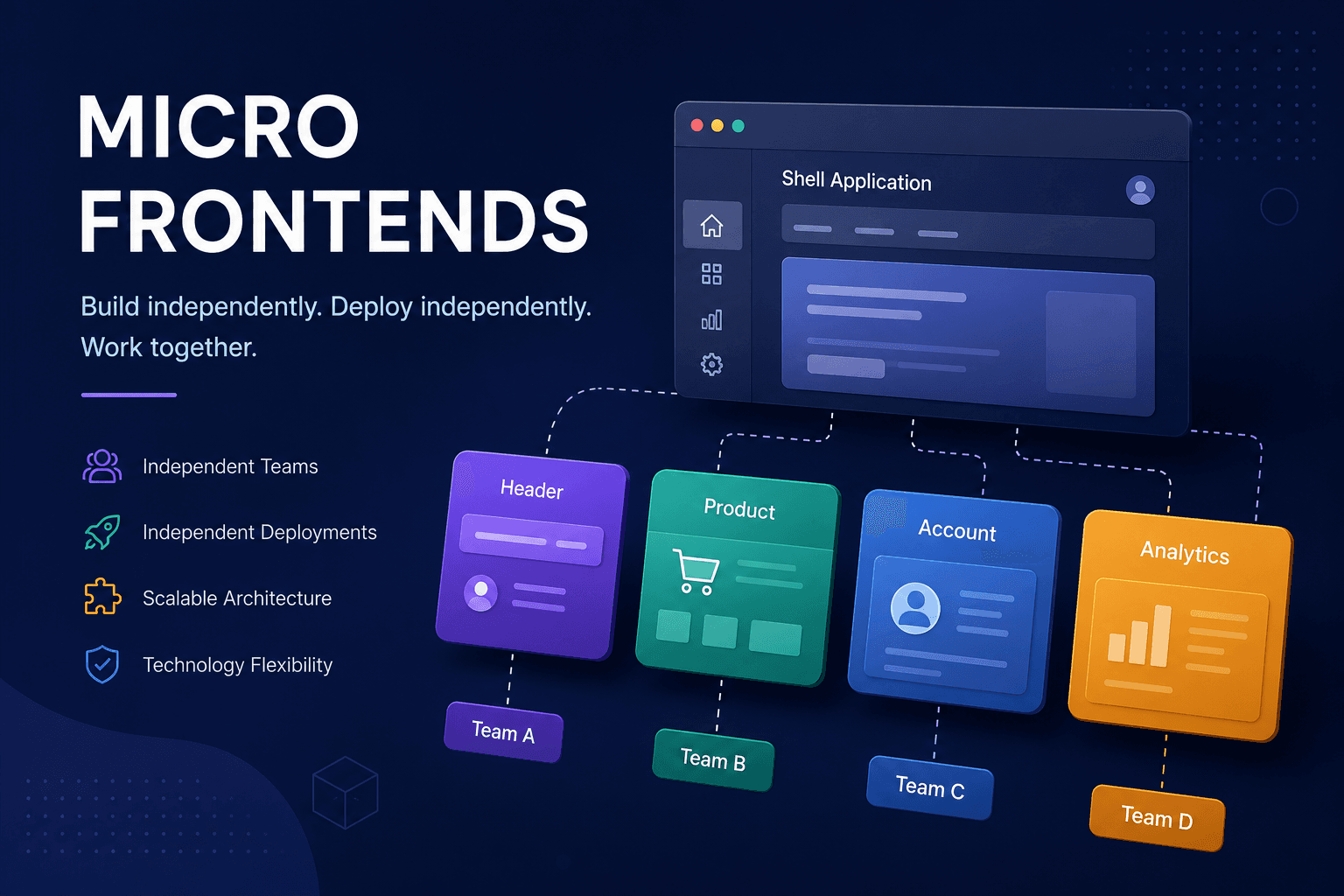
Micro frontends follow a similar idea to microservices. Instead of keeping the complete frontend inside one large application, we divide it into smaller applications. Each smaller application can be developed, tested, and sometimes deployed independently.
What Is a Micro Frontend?
A micro frontend is a small part of a larger frontend application.
For example, imagine an e-commerce platform. The application may contain several main areas:
- Product search
- Shopping cart
- User account
- Payment section
- Order history
- Analytics dashboard
In a traditional frontend architecture, all these features may be inside one React application.
In a micro-frontend architecture, each main area can be handled as a separate frontend module. One team may work on the product section, while another team works on payments or user accounts.
These smaller applications are connected together to give the user one complete experience.
From the user’s point of view, it still looks like one application. But behind the scenes, different teams may be building and maintaining different parts.
Why Do Teams Use Micro Frontends?
The biggest reason is scalability.
This does not only mean application performance. It also means team scalability and development scalability.
When many developers work inside the same large frontend codebase, several problems can happen.
Developers may change the same files. Pull requests may become difficult to review. A small update can affect another feature. Releases can become slower because the complete application must be tested and deployed again.
Micro frontends can reduce some of these problems by giving teams more ownership.
A team can be responsible for one feature from beginning to end. They can manage the user interface, business logic, testing, and release process for that area.
This can make development faster when the project and the team are large enough.
A Simple Example
Let us imagine a large transport management platform.
The platform contains:
- A live map
- Driver management
- Trip management
- Customer support tools
- Reports
- Admin settings
The live map may be one micro frontend. Reports may be another. Driver management may also be a separate module.
Each module can have its own components, routes, state management, and API integrations.
A main shell application connects all these modules together. The shell may manage shared parts such as:
- Navigation
- Authentication
- Global styling
- User permissions
- Error handling
This structure allows each team to focus on one business area without working inside every part of the application.
Main Benefits of Micro Frontends
1. Independent Team Ownership
One of the main benefits is that different teams can own different features.
A team can make decisions about its own module without waiting for every other team. This can reduce communication problems and make responsibilities clearer.
For example, the analytics team can work on dashboards while the operations team works on live tracking features.
2. Independent Deployments
In a good micro-frontend setup, one module can be deployed without releasing the complete frontend.
This is useful for large applications where different features are updated at different times.
A small issue in one module may also be fixed and released faster.
However, independent deployment requires a strong CI/CD process. Without good automation, it can become difficult to manage.
3. Smaller Codebases
Smaller codebases are usually easier to understand.
A developer does not need to learn the complete platform before making a change. They only need to understand the module they are working on and the shared contracts between modules.
This can also make onboarding easier for new developers.
4. Technology Flexibility
Different micro frontends can sometimes use different technologies.
For example, one module may use React, while another older module may use Vue.
However, I do not think teams should use different frameworks only because they can. Too many technologies can make the project harder to maintain.
Technology freedom should solve a real problem, not create a new one.
5. Easier Incremental Upgrades
Micro frontends can help when a company wants to modernize an old frontend.
Instead of rebuilding the complete application at once, the team can replace one section at a time.
For example, an older Angular module can slowly be replaced with React without stopping the whole product.
This is one of the most practical use cases for micro frontends.
Common Challenges
Micro frontends are useful, but they are not simple.
They move some problems from the application level to the architecture level.
Shared UI Consistency
When different teams build different sections, the user interface can become inconsistent.
Buttons may look different. Spacing may change between pages. Forms may behave differently.
A shared design system is very important.
Common components, design tokens, typography, colors, and interaction patterns should be clearly defined. Tools such as Storybook can also help teams develop and document shared UI components.
Shared Dependencies
Most frontend modules use common libraries such as React, routing libraries, UI libraries, and state-management tools.
If every micro frontend loads its own copy of React, the bundle size can increase.
Dependency versions can also create conflicts.
This is why shared dependencies must be planned carefully. Tools such as Module Federation can help share libraries between applications, but the configuration needs proper control.
Communication Between Micro Frontends
Sometimes one module needs to send data to another module.
For example, the shopping cart may need to update the header. A user-role change may need to update several modules.
There are different ways to handle this:
- Custom browser events
- Shared state
- URL parameters
- Shared services
- Event buses
The communication should be kept simple. If every module depends heavily on another module, the system is no longer truly independent.
Authentication and Permissions
Authentication is normally handled at the shell level.
The shell application can manage the logged-in user, access token, roles, and permissions. It can then provide the required information to each micro frontend.
Security rules should not only exist in the frontend. Backend APIs must also validate user access.
Local Development
Developers need a simple way to run their module locally.
They may also need to connect it with the shell application and other remote modules.
Without a good local development process, debugging can become frustrating.
Clear environment configuration, local fallback modules, and good documentation can save a lot of development time.
Testing
Testing a micro-frontend system requires different levels of testing.
Each module should have its own unit and integration tests. The complete application should also have end-to-end tests to make sure all modules work together.
A module may work correctly alone but fail when connected to the shell application.
Because of this, contract testing and end-to-end testing are very important.
Common Ways to Implement Micro Frontends
There is no single correct way to build micro frontends.
Build-Time Integration
In build-time integration, micro frontend packages are installed as dependencies.
This approach is simple, but all packages may still need to be released together. It gives code separation but not fully independent deployment.
Runtime Integration
Runtime integration loads micro frontends while the application is running.
Webpack Module Federation is a popular solution for this approach. It allows one application to load modules from another deployed application.
This gives more deployment freedom, but the setup is more complex.
Iframes
Iframes give strong isolation between applications.
However, they can create problems with routing, styling, accessibility, communication, and user experience.
They may still be useful in some cases, especially when integrating a completely separate or older system.
Web Components
Web Components can be used to create framework-independent UI elements.
They provide good isolation, but teams must still manage shared state, routing, and application communication.
The best implementation depends on the product, team structure, and technical requirements.
What I Learned from Working with Micro Frontends
One important lesson is that micro frontends are not only a technical decision.
They are also a team-structure decision.
The architecture works best when teams have clear ownership. Each team should understand its business area and be able to develop and release it with limited dependency on other teams.
Another lesson is that shared standards are still necessary.
Micro frontends give teams independence, but complete freedom can create inconsistency. Teams should agree on important areas such as:
- Design system
- Error handling
- Logging
- Authentication
- Testing
- API patterns
- Performance standards
I also learned that the shell application should remain as small as possible.
The shell should focus on responsibilities such as navigation, authentication, layout, and loading remote modules. Business logic should stay inside the related micro frontend.
If too much logic is added to the shell, it can become another large monolith.
Performance is another area that needs attention.
Loading many remote modules can affect initial page speed. Shared dependencies, lazy loading, caching, and bundle size should be monitored carefully.
Micro frontends do not automatically improve performance. In some cases, they can make performance worse when the architecture is not planned properly.
When Should You Use Micro Frontends?
Micro frontends can be a good choice when:
- The application is large
- Several teams work on the frontend
- Teams need independent releases
- Different business areas have clear boundaries
- The product will continue growing
- The company has strong CI/CD and testing processes
- An old frontend needs to be upgraded step by step
They are especially useful for enterprise applications, dashboards, admin platforms, financial systems, and large SaaS products.
When Should You Avoid Them?
Micro frontends may not be a good choice when:
- The application is small
- Only one or two developers work on it
- The project has a simple release process
- Business features are strongly connected
- The team does not have good deployment automation
- The additional architecture does not solve a real problem
For a small application, a well-structured React or Next.js project is usually enough.
###### A modular monolith can provide clean separation without the operational complexity of micro frontends.
Micro Frontends vs a Modular Monolith
A modular monolith keeps everything inside one application but organizes the code into clear feature modules.
For example:
src/
  features/
    authentication/
    dashboard/
    users/
    reports/
This structure can work very well for many projects.
The main difference is deployment.
In a modular monolith, all modules are normally built and deployed together. In a micro-frontend system, modules can be built and deployed separately.
My view is that teams should start with a clean modular architecture first.
When the product, team, and deployment requirements become large enough, some modules can be moved into micro frontends.
Starting with micro frontends too early can create unnecessary complexity.
Final Thoughts
Micro frontends can be a powerful architecture for large frontend systems.
They can improve team ownership, release speed, maintainability, and long-term scalability. They are also useful when modernizing older applications step by step.
But they are not a solution for every project.
They introduce new challenges in shared dependencies, UI consistency, communication, testing, deployment, and performance.
The most important question is not, “Can we use micro frontends?”
The better question is, “What problem will micro frontends solve for our team?”
When there is a clear reason, strong team ownership, and good engineering processes, micro frontends can work very well.
When those things are missing, a clean modular frontend may be the better choice.